

Choose an AI service. ChatGPT and Perplexity submit the summary request, Grok opens it ready to send, and other services open with the request copied as a fallback. If an AI cannot open the page, copy the article text and paste it into the chat.
The strongest keyword research list begins with what your business sells and the language customers use to describe their needs, not with the largest volume estimate a tool reports. Google reported that 15% of searches it sees each day are queries it has never seen before, which is a useful reminder that customer language keeps changing. Google’s statement supports a practical starting point: collect the ways people describe your offerings before sorting those phrases by search metrics.
What is Keyword Research?
Keyword research is the process of finding words and phrases that potential customers use to find information about products or services online. Many businesses use keyword research to include these words in their website content, increasing the chance that their website will appear in the search engine results page (SERP) when people type in those keywords. Many businesses use keyword research methods to conduct keyword research, including using online tools, talking to customers, and analyzing competitor websites. When used correctly, keyword research can be a very useful way to help your business connect with your target audience and increase your online visibility. Mostly keyword research is based off search volume, or how many times people search a particular query and this tells you where you can gain the most visibility.
Start by listing the Products, Services, and Problems Your Business Solves
Begin with a short inventory of your products or services, the problems they solve, and the people who buy them. For a plumbing company, that might include “water heater repair,” “low water pressure,” and “emergency plumber”; for a consultant, the list could cover the service, industry, and business challenge. These are seed topics to investigate, not final keyword targets. Google Keyword Planner can generate ideas from terms related to your products or services, while Semrush organizes related ideas into keyword groups.
Keep adjacent offerings separate at first. Someone searching for a specific repair may need a service page, whereas a person looking for ways to diagnose the problem may need an explanatory article. That distinction becomes valuable later, when you decide which page can satisfy each search. For a paid search campaign, see our PPC keyword research guide as you are really targeting end of the funnel queries in that case.
Turn Customer Questions and Everyday Phrases Into Seed Keywords
Gather exact phrases from sales calls, customer emails, reviews, support requests, and conversations with staff. Then group them according to the problem customers describe, the outcome they want, and the language they use when evaluating options. “Who can fix a leaking pipe today?” points to a different need from “How do I stop a pipe leak?” The wording offers a clue, but the search results should still be checked before a page is planned, but in Bangkok you would expect more Aircon engineer style queries vs plumbing.
Once recurring questions have been collected, turn them into a seed list and expand it with SEO research tools. KWFinder.com can also be included in this stage as another source of keyword ideas and demand estimates. These tools are useful for expansion, but they don’t determine which topics are genuinely valuable to your customers.
Use Research Tools and LLMs to Expand the Topic Set
Research tools help expand seed ideas, inspect demand estimates, and identify how competing pages address related queries. They don’t decide which searches matter to your business; that judgment is still required. Service Direct’s 2024 State of Search Marketing for Small Businesses survey found that 84% of surveyed small businesses purchased third-party tools or software to plan or execute at least part of their search marketing. Here are 4 we at TBS Marketing use all the time.
Expand Your Ideas With Google Keyword Planner, KWFinder.com, Semrush, and Ahrefs
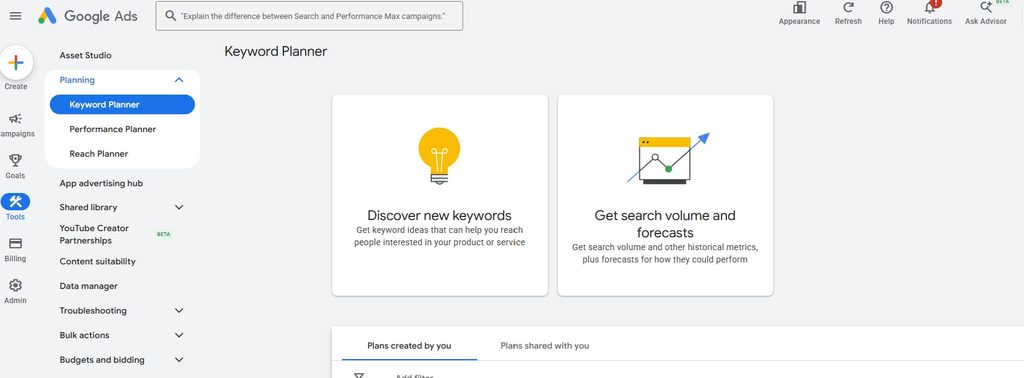
Start with Google Keyword Planner when you need Google Ads keyword ideas and estimates of monthly searches. It can produce ideas from seed terms or a website, and Google lets users refine results by criteria such as keyword text and competition. Treat the figures as estimates tied to selected settings, not as a promise of website visits or customers. Google still combines some terms so volume is not always for a single term, more for a group.
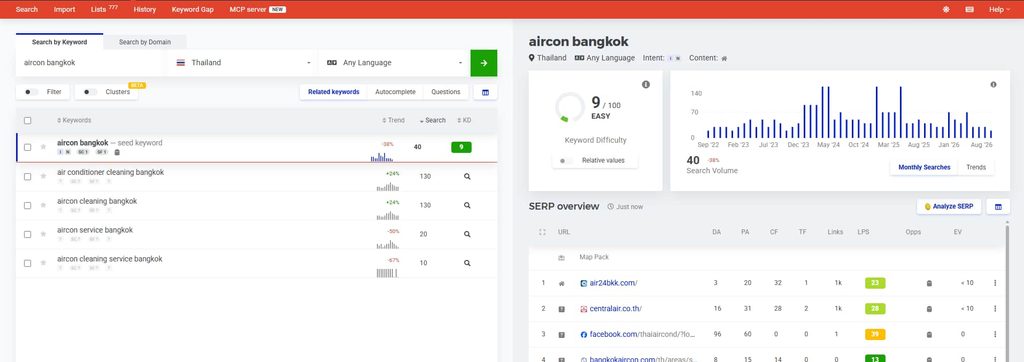
KWFinder.com can be used alongside Google Keyword Planner to explore related phrases, compare estimated demand, and identify possible long-tail opportunities. Its results should be treated as research inputs rather than final decisions, just like the estimates from other platforms.
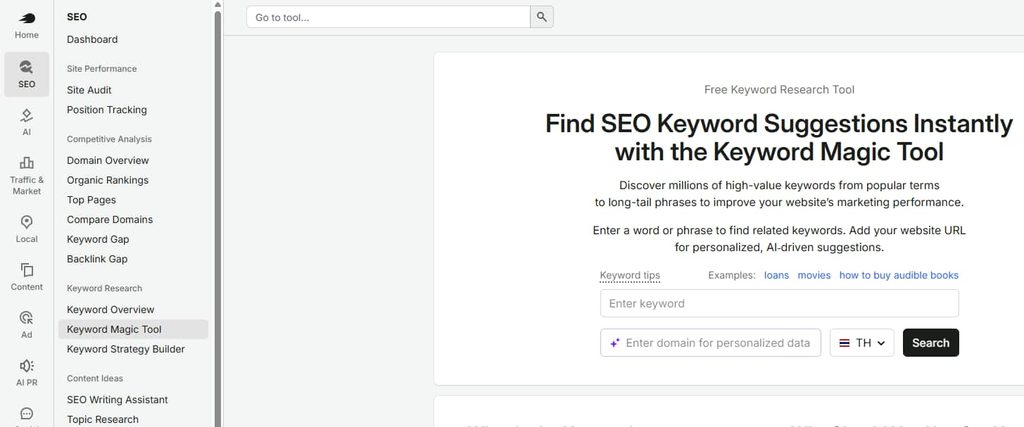
Semrush and Ahrefs can help investigate organic search opportunities. Semrush reports keyword metrics such as estimated volume, intent, and keyword difficulty and uses AI to expand on inputs; Ahrefs’ competitor research can show terms for which a rival ranks and your site does not, which is useful for finding the niche leader. Use more than one source when a candidate keyword seems promising, then inspect the live results for the location you serve. Metrics across providers are estimates and may not describe the same market or calculation, so use multiple for correlative accuracy.
ChatGPT or another LLM can add breadth by suggesting questions, comparisons, objections, and next-step searches that may not appear in a basic keyword export. The model should be used for ideation and organization, not as proof that a topic has search demand. Validate promising suggestions in Google Keyword Planner, KWFinder.com, Semrush, Ahrefs, and the live search results before publishing. And you can even connect KWfinder via MCP to help the chatbot do the planning for you, but you must check results for accuracy.
Use a prompt such as this when you want an LLM to help build a topical map:
Review my website ADD SITE then create a topical map of topics users may ask along the query path to find my businesses solutions or products. Review my sites sitemap and suggest only new angles of intent that offer value to a customer.
Obviously Volume for Google Ads Planner helps show you where the searches are and where to win traffic, but for depth consider more what aligns with your audience for your specific service or product as contextual alignment matters more than keyword hunting.
Replace ADD SITE with the website URL, and provide the sitemap when possible which usually ends /sitemap.xml. Ask the LLM to distinguish existing topics from genuinely new angles; otherwise, it may simply reword pages that already exist.
- Enter a seed phrase based on a real product, service, or customer question.
- Set the market to the country or locality relevant to your customers.
- Export and sort ideas by topic, intent, estimated demand, and likely business value.
- Ask an LLM for topic-path ideas that connect customer questions to the relevant product or service.
- Check the results page before assigning a phrase to a new or existing page.
Use Competitor Pages to Spot Relevant and Underserved Searches
Review competitors that serve the same customers, not simply businesses that sell similar products. A competing page may rank for a relevant problem or question that your site doesn’t address. Ahrefs’ Content Gap process compares keywords that competitor sites rank for against terms absent from your site; Semrush also describes keyword-gap research for finding missing terms. Use those gaps as ideas to evaluate, not pages to copy: Google’s people-first guidance asks whether content provides useful, substantial information for its intended audience.
Evaluate Search Intent, Demand, Competition, and Location
Choose keywords by considering four things together: what the searcher wants, how much demand tools estimate, how competitive the organic results appear (and if results align), and where the search is happening. A phrase can attract searches and still be a poor target if the people searching aren’t looking for your service. Google’s Keyword Planner reports ad-related competition, while SEO platforms provide separate organic-difficulty estimates; those metrics answer different questions.
Match Search Intent to the Page a Searcher Needs
Search intent is the goal behind a query. A searcher may want an explanation, a particular website, a comparison before buying, or a way to take action; Semrush groups these into informational, navigational, commercial, and transactional categories. The most useful check is direct: search the phrase and compare the pages that appear. If the results mainly show service pages, a broad informational article may not meet the same need. If guides and explainers dominate, a hard-sell landing page may feel misplaced and will struggle to rank.
Match the page format to the dominant results and to the service you can genuinely provide. Google’s guidance calls for content that serves people rather than pages created primarily to attract search traffic. For a small business, that means a service page should explain the offering and next steps, while an informational page should answer the question it targets. In simple terms, the page needs to fit the search.
Compare Search Volume With Keyword Difficulty and Competition
Search volume estimates demand; keyword difficulty estimates how challenging organic ranking may be; Keyword Planner’s competition describes advertiser activity. Don’t treat these measures as interchangeable. Google defines its competition metric by the number of advertisers showing for a keyword relative to other keywords, whereas Ahrefs distinguishes that paid-search competition from organic keyword difficulty. Semrush likewise reports separate metrics for organic difficulty and paid competitive density.
| Metric | What it helps you assess | What it cannot establish alone |
|---|---|---|
| Search volume | Estimated query demand in a selected market and period | Whether searchers will click or become customers |
| Organic keyword difficulty | A tool’s estimate of ranking challenge | Your actual ability to rank without reviewing results and your site |
| Paid competition | Advertiser activity for a term | How difficult organic rankings will be |
Look at the pages already ranking, their page types, and whether your site can provide a more relevant answer. The Ahrefs guidance on competitor analysis also cautions against relying on a difficulty score by itself; Semrush reports both metrics and search-result information to support a wider assessment. KWFinder.com and other tools can narrow the list, but the results page remains the final reality check.
Find Local and Hyperlocal Keywords for Nearby Customers
Local keywords connect a service or product to a place, such as “dentist in Silom” or “roof repair near downtown.” Add geographic modifiers only where they reflect real service coverage; a location phrase cannot make a business relevant to an area it does not serve. Google says local results are shaped mainly by relevance, distance, and prominence, so keyword wording is only one part of local visibility.
Check the local search results, map listings, and directories for the places you actually serve. BrightLocal’s 2024 Business Listings Visibility Study analyzed 8,000 Google organic results for local-intent searches and found that business directories made up 31% of results overall and 37% of informational local-intent results. That finding suggests a local keyword plan should account for directory visibility as well as your own pages; Google’s local guidance separately emphasizes complete business information and relevance.
Prioritize Keywords by Their Potential to Generate Business
Prioritize searches that connect a real customer need to an offer you can fulfill, rather than phrases that merely look impressive in a volume column. SparkToro’s analysis of 2024 clickstream data, supplied by Datos, found that 58.5% of U.S. Google searches resulted in zero clicks. Search Engine Land reported the same figure from the study, underscoring why estimated search volume alone can’t predict visits or business outcomes. With AI on the rise this number will only reduce, making top visibility a must in this new age.
Score Keywords by Relevance, Lead Potential, and Ranking Feasibility
Use a simple scoring sheet so candidate terms can be compared consistently. Rate each one for fit with your offer, likelihood of attracting a qualified lead, and the feasibility of creating a page that competes with current results. Add estimated demand and geographic fit as context, not as substitutes for business judgment. Google Search Console can later show which queries generate impressions and clicks for your site, while search tools provide estimates before publication.
- Relevance: Does the phrase describe a service, product, or customer problem you address?
- Lead potential: Does the search suggest research, comparison, or readiness to contact or buy?
- Feasibility: Can you create a page that serves the intent and competes with the visible results?
- Location fit: Does the phrase match your actual service area or customer market?
Choose Valuable Searches Over High-Traffic Terms That Are a Poor Fit
A broad, high-volume phrase may attract people who want information you don’t provide or who live outside your market. A narrower phrase with explicit service or location intent may be more relevant to your business even if its estimated volume is lower. The decision should follow the page’s purpose and the search results, not an arbitrary minimum volume threshold. Google’s people-first guidance and SparkToro’s clickstream analysis both support looking beyond traffic estimates when evaluating a search opportunity.
Organize Keywords Into Topic Clusters and Map Them to Pages
Group related phrases by subject and intent, then assign each group to a page that can answer it clearly. A cluster isn’t a reason to place every variation on one page; it is a way to see which searches share a need and which call for separate content. Semrush’s keyword tools group related terms, while Google recommends clear, useful content organized around the purpose of the page.
Group Related Searches by Topic and Search Intent
Combine close variants when the search results show similar page types and the same underlying need. Separate them when the intent changes; for example, a “how to choose” query may call for a guide, while a “book a service” query calls for a service or booking page. This approach keeps the keyword map tied to what the searcher needs instead of treating every wording variation as a separate content assignment.
Assign Keywords to Existing or Planned Service and Content Pages
Create a page map with one primary topic for each existing or planned URL, along with closely related secondary phrases. Before drafting a new page, check whether an existing page already answers the same need. Google’s canonicalization documentation says it may group multiple pages that appear to have the same or very similar main content; Ahrefs also recommends evaluating whether multiple URLs targeting a query represent a genuine problem rather than assuming that every shared keyword is harmful.
| Page type | Suitable keyword pattern | Page’s job |
|---|---|---|
| Service page | Service plus location or specific need | Explain the service and how a customer can take the next step |
| Guide or article | Question, comparison, or informational topic | Answer the question with useful detail |
| Product page | Product name, type, or buying requirement | Describe the product and support an informed purchase |
Monitor Results and Refresh Keywords as Demand and Customer Language Change
Use Google Search Console’s Performance report to review queries, impressions, clicks, click-through rate, and average position over time. Compare the queries appearing for each page against the intent you assigned; new customer wording may reveal a useful content addition, while a mismatch may call for a revised page. Search Console reports observed performance, whereas keyword tools estimate broader demand, so use both views for different jobs.
Keyword Research Pitfalls Small Businesses Should Avoid
The most common planning errors occur when tool metrics are treated as answers rather than clues. A keyword list can look precise while targeting the wrong audience, page type, or location. Google’s documentation and keyword platforms distinguish user-focused content from search-engine-first publishing and separate paid competition from organic difficulty.
Avoid Choosing Keywords by Volume or Difficulty Score Alone
Volume doesn’t reveal whether searchers will click, and a difficulty score can’t fully account for your site, expertise, or the actual pages ranking. SparkToro’s zero-click finding illustrates the gap between a search estimate and a website visit; Ahrefs describes its difficulty score as a rough guide, and Google Keyword Planner defines its competition metric in terms of advertisers. Review the results page and your ability to serve the search before committing.
Prevent Search Intent Mismatches and Multiple Pages Targeting the Same Query
Don’t publish a service page for a question that results pages answer with guides, or create a new article simply because a tool surfaced another phrase. Check whether two of your pages answer the same intent; if so, improve or consolidate the page map rather than automatically producing another URL. Google’s canonicalization guidance explains how it handles pages with very similar main content, and Search Console can show which pages receive impressions for particular queries.
Turn Your Keyword Map Into a Practical SEO Roadmap
Convert the map into a sequence of page updates and content projects. Start with searches closest to the services or products you sell, then schedule informational content that supports those customer decisions. For each proposed task, record the target page, its primary intent, related phrases, service area if relevant, and the business outcome you’ll monitor.
Use the resulting themes to create an effective SEO strategy and reflect related concepts through semantic SEO principles. For smaller companies, SEO services for small businesses and local SEO services address different needs; the right fit depends on whether your audience searches broadly or within a service area.
Google Search Console can track query impressions and clicks after publication; Google Keyword Planner can help review estimated demand and seasonal patterns during planning. For broader guidance on tool selection, see our SEO research tools.
- Audit current pages: Match existing URLs to the customer needs they already serve.
- Resolve overlaps: Identify pages that target the same intent and decide whether to refine, combine, or distinguish them.
- Choose the next work: Prioritize relevant, feasible opportunities that support a product, service, or qualified customer question.
- Measure and revise: Review query-level impressions and clicks, then update the map when search behavior or business priorities change.
Keep the roadmap tied to actual customer language: review new inquiries and Search Console queries during each planning cycle, then decide whether they signal a new page, a clearer answer on an existing page, or no change at all. This can also be called a Topical Map and should be what guides your content plans.
Sign in to share. Facebook and LinkedIn need the article page to be publicly accessible to show its preview. If an AI cannot open the page, copy the article text from the section above.