
Choose an AI service. ChatGPT and Perplexity submit the summary request, Grok opens it ready to send, and other services open with the request copied as a fallback. If an AI cannot open the page, copy the article text and paste it into the chat.
Visual marketing uses photography, video, graphics and other visual formats to communicate a business’s message. A product demonstration, a customer interview and a clear comparison chart all serve different purposes. The useful question is which one helps your audience take the next step.
For businesses planning content in 2026, the opportunity extends beyond making more videos. Build a visual marketing programme that combines relevant ideas, credible people, useful product information and a recognisable brand identity.
Recent research from Adobe, TikTok and YouTube points towards several overlapping themes: personal relevance, human connection, creator participation and content that supports discovery. These reports describe different audiences and platforms, so treat their findings as signals to investigate rather than promises of better results.
This guide translates those themes into practical recommendations. The examples are illustrative, and the planning advice gives you a starting point to test with your own customers.
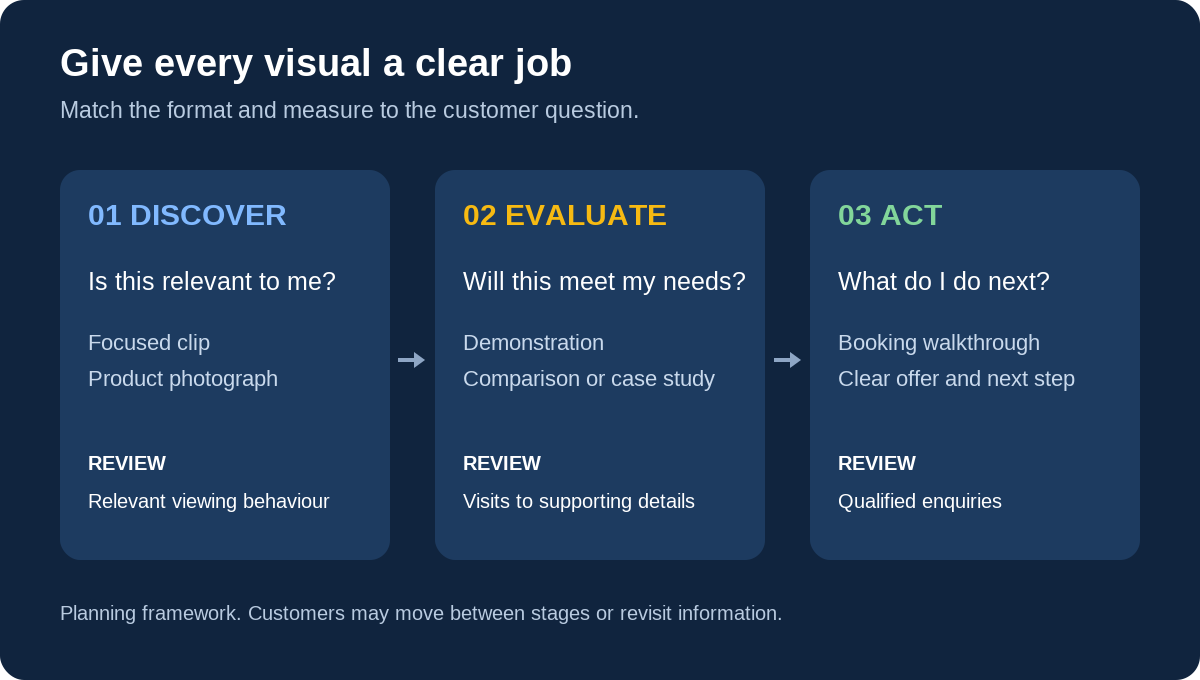
1. Give Every Visual a Clear Job
Before choosing a format, decide what the content should accomplish.
A person discovering your business needs different information from someone comparing suppliers. An entertaining clip might introduce your brand, while a detailed walkthrough could answer the question preventing a purchase.
Start each brief with one sentence: “After seeing this, the viewer should understand…”
For a restaurant, that might be what makes a signature dish distinctive. For a software company, it could be how an approval process works. For a hotel, it might be whether a room suits a family with young children.
Then select the visual evidence needed to communicate that point. Show the dish being prepared, demonstrate the software task or film the room’s layout.
Avoid asking one asset to introduce your business, explain every service, answer all objections and close a sale. Give it a primary purpose and a relevant next step.
Try this: Review your last ten visual posts. Write down the intended audience, main message and next action for each. If those are unclear, improve the brief before increasing production.
2. Build a Video Mix Around Customer Questions
Short-form video belongs in the planning conversation, alongside longer explanations, photography and graphics. Choose the length around the information you need to communicate.
Use a short video for one focused idea: a quick demonstration, a practical tip, a frequently asked question or a glimpse behind the scenes. Open with the subject or problem so viewers can understand the premise immediately.
Give more complex topics enough room. A service walkthrough, product comparison or customer case study may need a longer format to explain the details responsibly.
For example, a property business could create a short clip showing a distinctive feature, followed by a fuller walkthrough covering layout, location and practical considerations. Both assets can come from the same shoot, but each needs its own structure.
Plan the main shots before filming. Record clear audio, capture useful close-ups and leave room for captions. When adapting footage, check the crop rather than assuming the same composition works everywhere.
Try this: Choose one customer question and answer it in a short clip. Create a longer explanation only if the question warrants more detail. Compare the quality of enquiries each generates.
3. Put Real People and Real Processes on Screen
TikTok’s 2026 forecast emphasises real stories and community participation. YouTube’s research also highlights relationships between creators and their communities. Adobe’s consumer research identifies authenticity and relevance among the qualities associated with engagement.
For your business, start by identifying people who can explain the work clearly: an employee, founder, customer or relevant creator.
A technician could demonstrate a routine check. A designer might explain a packaging choice. A restaurant team could show how it prepares an ingredient. These examples give viewers something specific to assess.
Prepare contributors with a clear topic and a few prompts. Let them explain it naturally, then edit for clarity. Use a script where accuracy demands one, but avoid giving every speaker identical promotional language.
Customer stories should describe a real situation, what your business provided and what happened afterwards. Obtain permission before filming or publishing identifiable people, and check any performance claims against supporting records.
Try this: Record a team member answering a question customers regularly ask. Keep the answer focused and show the relevant work while they explain it.
4. Treat Creator Partnerships as an Editorial Decision
A creator partnership needs more than a familiar face. Evaluate whether the person’s subject knowledge, audience and communication style suit the buying question you want to address.
YouTube’s shopping research examines the relationship between creators, communities, content formats and product discovery. TikTok’s forecast similarly encourages brands to understand niche conversations and work with relevant creators.
Apply that thinking to your selection process. Review how potential partners explain products, respond to questions and handle commercial relationships. Ask for relevant audience information and examples of previous work.
Define the required facts, permitted claims, disclosures, usage rights and approval process in the brief. Give the creator room to communicate in a style their audience recognises.
A specialist explaining a product’s limitations may offer a more useful contribution than an enthusiastic endorsement without detail. Decide what useful information the partnership should produce before discussing follower counts.
Try this: Write a one-page partnership brief around a customer problem. Use it to assess whether a potential creator has the experience and audience fit to address that problem credibly.
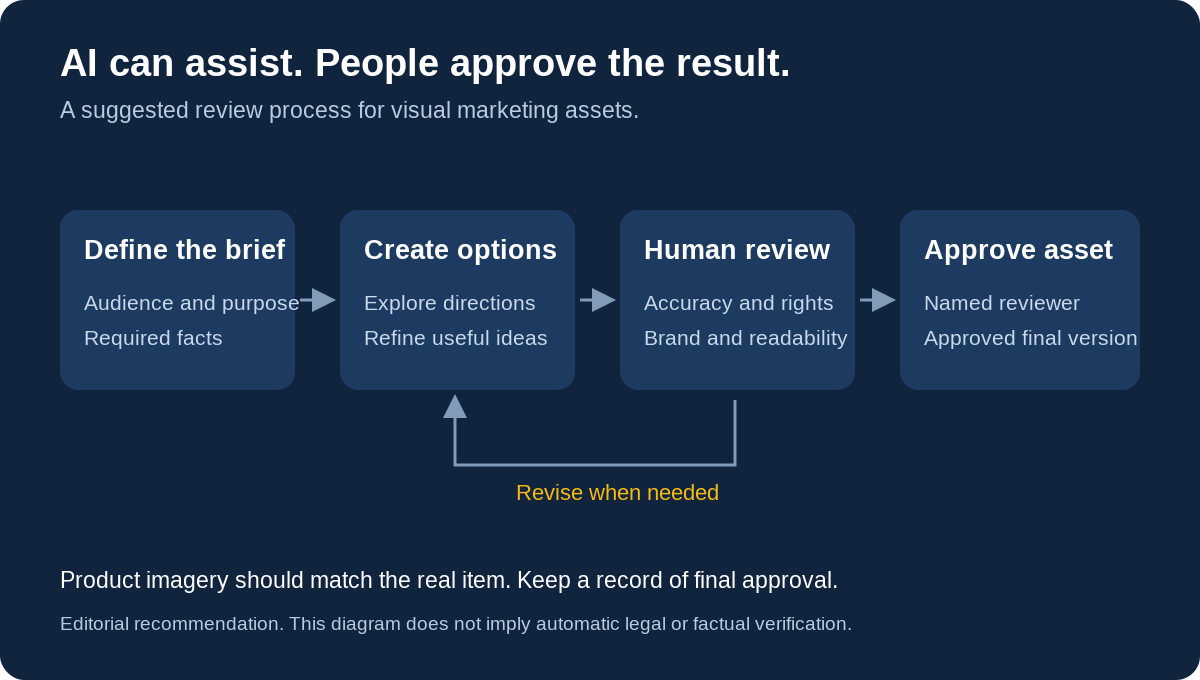
5. Use AI Within a Defined Creative Workflow
AI-assisted production deserves a place in the 2026 discussion. Adobe’s creator research describes uses across ideation, asset generation and editing, while its consumer research shows that people’s comfort with AI depends on context.
For a business, define where AI can contribute and where human review remains necessary.
Possible tasks include exploring visual directions, drafting storyboard options, proposing layouts and preparing variations for review. Evaluate the output against your actual brief rather than accepting it because it looks polished.
Use extra care when a visual represents something customers will buy. Check product shape, colour, packaging, dimensions, interfaces and other details against the real item. Avoid presenting an invented location, customer or result as documentary evidence.
Check the tool’s terms and the permissions attached to any source material. Keep an approval record for the final asset, particularly when several people or suppliers contribute to production.
Try this: Test AI on one defined task. Record production time, revision time and rejected outputs. Judge the workflow by the approved result and total effort.
6. Create Visuals That Help People Evaluate a Purchase
Build content around the questions customers ask before buying:
What does it look like in use? How large is it? What is included? What happens after booking? How does it differ from another option?
Answer with the most suitable format. A photograph may communicate scale. A comparison graphic can organise differences. A demonstration can show a process that is difficult to describe in a paragraph.
For a service business, map the stages from enquiry to delivery. Show sample outputs, explain responsibilities and clarify what customers need to prepare.
Keep claims specific. If a demonstration uses particular conditions, make those conditions clear. Show limitations where they affect a buying decision.
Where product tagging or shopping features are available, check their suitability for your account, market and product category. Connect the content to a page where viewers can verify details and take the next step.
Try this: Ask your sales or customer service team for five recurring questions. Produce one visual answer to each, then assess whether customers find them useful.
7. Make Brand Consistency Practical
Create a small visual toolkit that people can use without interpreting a long brand manual.
Include approved colours, typefaces, logo rules, image treatments and examples of finished work. Add templates for recurring formats such as a tip, product feature, case study and testimonial.
Define a clear hierarchy. The main message should stand out first, supporting detail should be easy to follow, and the next action should be visible where relevant.
Keep the content recognisable across formats while adapting the layout to its destination. A website banner, vertical video and presentation slide need different compositions.
Assign someone to maintain the templates. Remove outdated versions so staff and suppliers can identify the current files easily.
Try this: Give two colleagues the same brief and toolkit. Compare their outputs. Where the results differ unexpectedly, improve the guidance or template.
8. Design for Readability Before Adding Decoration
Check visual content at the size people will actually see it.
A headline that reads well on a large monitor may become difficult to understand in a small preview. Review banners and graphics on a phone, and simplify the message if necessary.
When placing text over an image, use a darker overlay or a controlled background area. Check every part of the wording, especially where the photograph changes from dark to light.
For video, review captions for accuracy, timing and placement. Keep them clear of relevant actions and interface controls. Avoid relying on colour alone to explain a difference.
On your website, provide useful text alternatives for informative images and keep essential information available in readable page text. A graphic should complement the explanation.
Try this: Ask a colleague to review an asset at its intended viewing size. Can they identify the message and next step without zooming or extra explanation?
9. Plan Adaptation Before Production
Build a distribution plan into the brief.
List where the content will appear and identify the versions each placement needs. Plan crops, opening frames, captions, thumbnails and calls to action before recording or designing.
During a shoot, capture supporting material deliberately: detail shots, wider context, alternative compositions and clean backgrounds. This gives the editor useful choices.
Repurpose around the information. One interview might support a case study, an objection-handling clip and a quotation graphic, provided each extract preserves the speaker’s meaning.
Review every adaptation separately. A crop may remove important context, and a shortened quote may need an explanatory caption.
Try this: Plan one production session around a single customer problem. Prepare three outputs with distinct purposes, then assess whether each feels complete on its own.
10. Measure the Action You Want to Encourage
Choose success measures before publishing.
For awareness content, you might review reach and relevant viewing behaviour. For educational content, consider engagement with the explanation and visits to supporting pages. For enquiry campaigns, examine qualified leads and the questions those leads ask.
Treat platform metrics as part of the evidence. A widely viewed post can still attract the wrong audience, while a smaller piece may support valuable sales conversations.
Use consistent campaign tracking and clear reporting periods. When comparing assets, record differences in audience, spending, placement and timing. If you are deciding how visual content fits into your channel mix, read our guide to SEM vs SMM: differences, benefits, costs and strategy for a comparison of search and social marketing objectives.
Test a defined question, such as whether a demonstration or customer explanation produces more qualified enquiries. Change as little else as practical, and avoid declaring a winner from a handful of results.
Try this: Add a short note to each brief: the intended action, how it will be measured and when the team will review it.
A Four-Week Visual Marketing Plan
Use this as a planning example and adjust it to your production capacity.
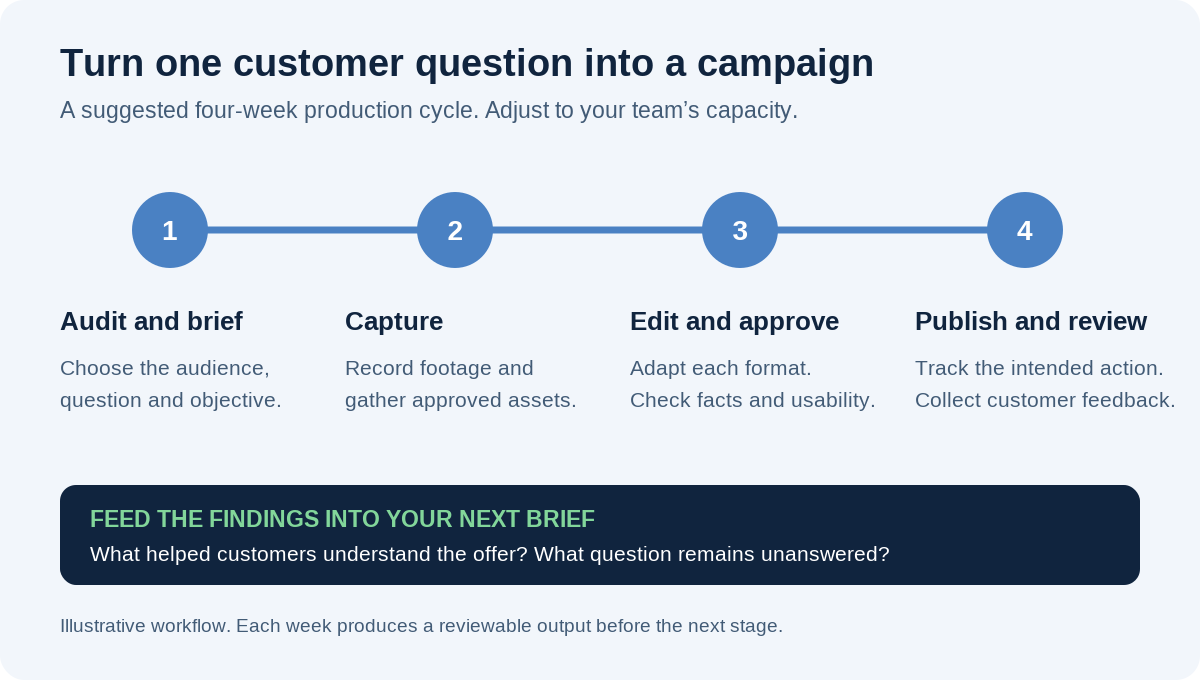
| Week | Main task | Reviewable output |
|---|---|---|
| 1 | Audit existing assets and recurring customer questions | Priority list and three focused briefs |
| 2 | Capture footage, photography and approved customer input | Organised source material |
| 3 | Edit, adapt and review | Approved assets for selected placements |
| 4 | Publish, monitor and collect feedback | Performance notes and the next test |
Keep the first cycle manageable. Choose one audience, one business objective and a small set of questions. If you need help connecting those questions to an ongoing editorial plan, explore our content marketing services.
Assign responsibility for factual review, creative approval and publication. Before release, check wording, permissions, product accuracy, captions, links and mobile readability.
At the review stage, ask what the content helped customers understand. Use that answer alongside campaign data to improve the next brief. For website content, our article on aligning SEO with content development explains why customer intent should inform planning from the start.
Frequently Asked Questions
Does every business need to publish video?
Choose formats around the information customers need and the resources available. Begin with a focused test. Photography, diagrams and written explanations may also suit the task.
Do we need professional actors and expensive equipment?
Match production to the brief. An employee explanation may suit a straightforward question, while a campaign with complex lighting, sound or multiple locations may warrant a production team. Test a sample before committing to a larger shoot. For a project that needs filming and editing support, review our professional videography services.
Should we use AI-generated images?
Consider the purpose and the accuracy required. Review generated visuals carefully when they represent products, services or real experiences. Keep a person responsible for approving the final work.
Which trend should we test first?
Start with a gap in the customer journey. Choose a recurring question, create a clear visual answer and measure the response. Use that evidence to decide what deserves further investment.
How often should we update this article and our content plan?
Schedule regular reviews and revisit material when products, customer questions or platform requirements change. Record substantive updates so the displayed review date reflects the work completed.
Put Your Next Visual Campaign Into Production
TBS Marketing’s media production and design services cover photography, video and creative design. Bring your audience, offer and priority customer questions to the brief so the team can recommend suitable formats and production requirements.
Which question do your customers ask most often before they enquire or buy? That could be the starting point for your next visual.
Research and Scope
This guide draws on Adobe’s 2026 AI and Digital Trends consumer research, TikTok Next 2026 and YouTube’s 2025 shopping research. The reports cover different populations and platform contexts. Their findings inform the themes discussed here; the examples, production checklist and four-week plan are editorial recommendations to test.
Sign in to share. Facebook and LinkedIn need the article page to be publicly accessible to show its preview. If an AI cannot open the page, copy the article text from the section above.