
Choose an AI service. ChatGPT and Perplexity submit the summary request, Grok opens it ready to send, and other services open with the request copied as a fallback. If an AI cannot open the page, copy the article text and paste it into the chat.
Interesting content does more than hold attention. It helps visitors find the information they need, understand what to do next, and take a useful action. A clear structure supports that experience, while a content map helps you plan what to publish, for whom, and where.
Content mapping is the process of organizing content around audience needs, business goals, and the customer journey. A content map is the plan or visual representation that shows how those pieces connect. It is different from a page layout, which arranges elements on one page, and from a simple outline, which organizes one piece of writing.
Use both levels of planning: map the content strategy first, then structure each page so readers can scan and follow it. The result can be clearer, more relevant content, though engagement depends on the quality of the material and how well it meets readers’ needs.
Why is effective website layout important for website visitors?
Visitors rarely read a page from the first word to the last. They scan headings, look for familiar terms, and decide whether a section answers their question. A dense, uninterrupted block of text makes that harder and can cause readers to leave before they reach the useful information.
Organize each page around a clear hierarchy. A descriptive heading introduces the main point; subheadings divide it into manageable sections; short paragraphs explain one idea at a time. Lists, diagrams, screenshots, and other relevant visuals can clarify a process or make comparisons easier to understand.
Layout also affects navigation and accessibility. Baymard Institute’s homepage and category navigation benchmark rated 58% of desktop sites and 67% of mobile sites mediocre or poor for navigation UX. That finding points to a practical lesson: visitors need clear labels, predictable paths, and layouts that work across screen sizes.
Visual polish alone does not make content accessible. Add meaningful alternative text to informative images, use headings in a logical order, and make links descriptive enough to explain their destination. Check that text remains readable on mobile and that color is not the only way you communicate meaning.
Page-layout choices that help readers stay engaged
- Write useful headings. Tell readers what each section contains instead of relying on vague labels such as “More” or “Details.”
- Keep paragraphs focused. Put the central point near the start, then add context or examples.
- Choose visuals with a job to do. Use an image, chart, or diagram when it explains, demonstrates, or helps readers compare information.
- Make the next step visible. Place a relevant call to action where it follows naturally from the information.
- Review the mobile experience. Check whether headings wrap clearly, buttons are easy to find, and important content remains easy to scan.
What are the main types of content maps?
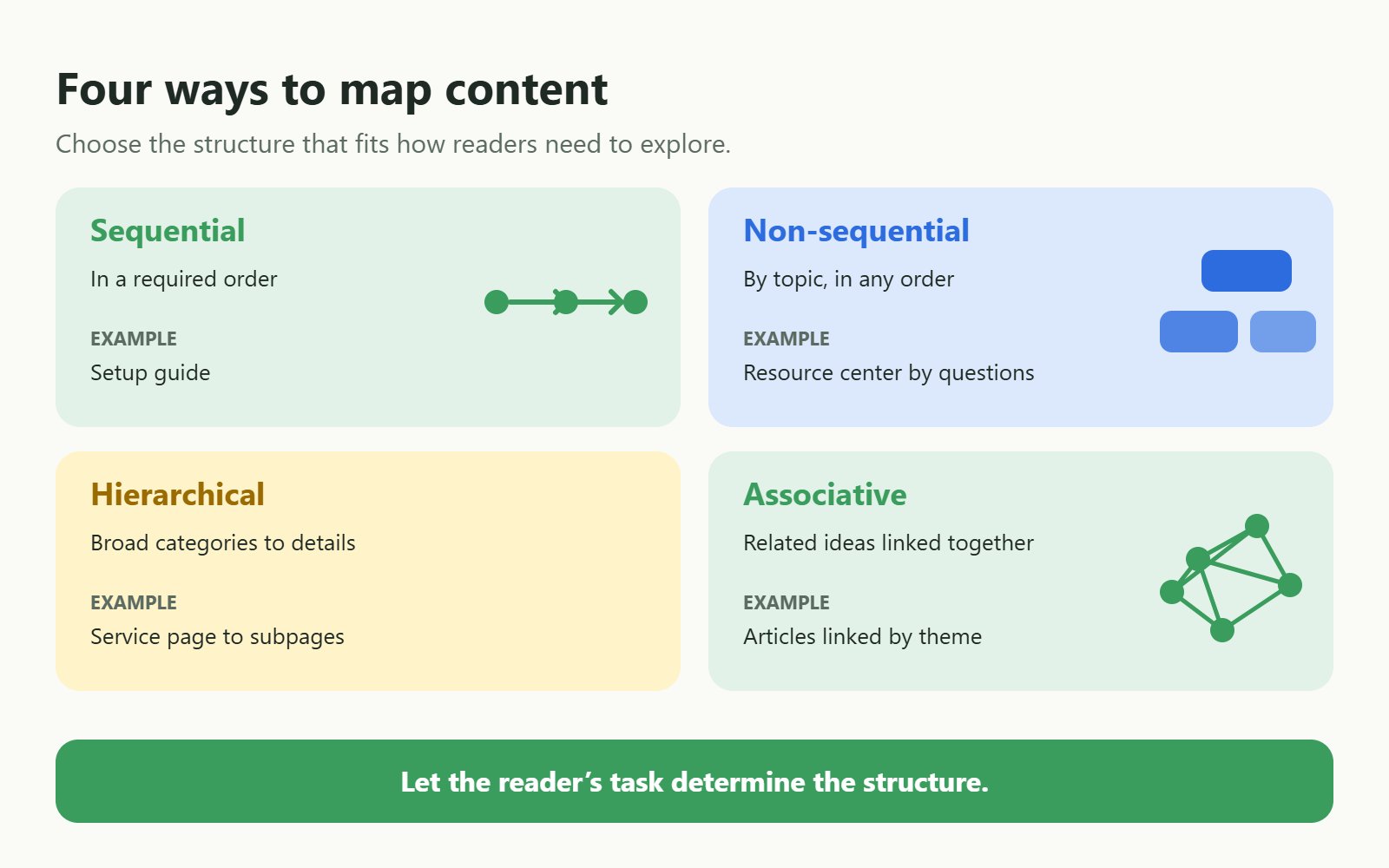
Choose a map based on how readers need to understand the information. Some content needs a clear sequence; other content works better when readers can explore related topics in any order. The map should make the message easier to follow, not add complexity.
| Content map type | How it is organized | Useful when | Example |
|---|---|---|---|
| Sequential | In chronological or step-by-step order | Readers must follow stages in a particular order | A setup guide or onboarding series |
| Non-sequential | By topic or idea, without a required order | Readers want to choose the subject most relevant to them | A resource center organized by customer questions |
| Hierarchical | Top-down, from broad categories to specific details | A large site or knowledge base needs clear levels | A main service page leading to service-specific pages |
| Associative | Through related ideas and flexible connections | Readers may benefit from exploring connected topics | Related articles linked by themes or shared questions |
You can combine these approaches. A learning center might use a hierarchical structure for its main categories, sequential lessons within a course, and associative links to related articles. Let the reader’s task determine the structure.
How to Choose a Content Map That Fits Your Purpose
Start with the intended result. Decide whether the content should explain, guide, persuade, entertain, or help someone compare options. Then identify the audience and the question they need answered. Those choices shape the topics, formats, sequence, and call to action.
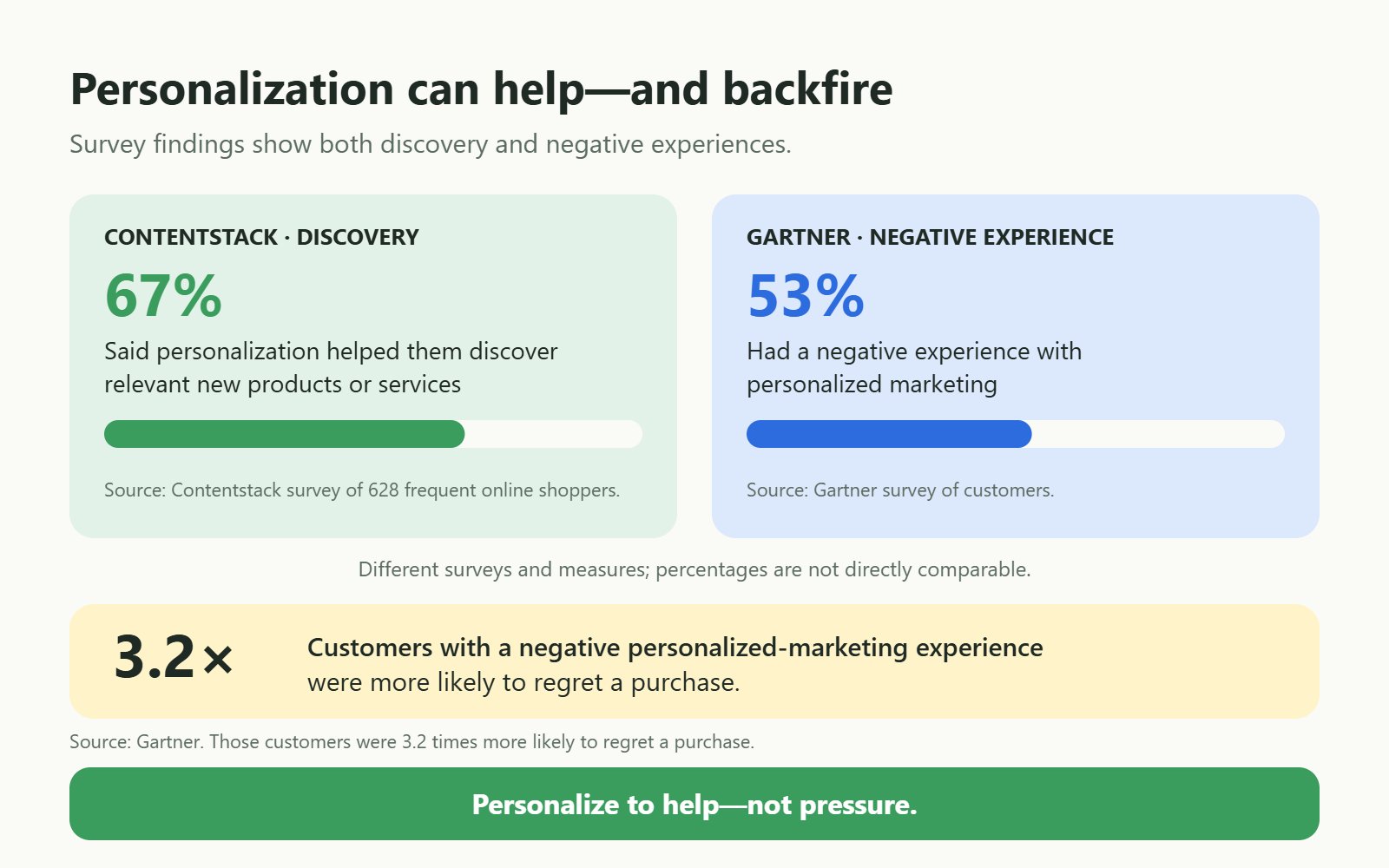
For business content, consider how early a reader may form preferences. Gartner reported that 53% of surveyed customers had a negative experience with personalized marketing; those customers were 3.2 times more likely to regret a purchase. Personalization can help make content relevant, but use it to answer real needs rather than to pressure readers or make assumptions about them.
A practical process for building a content map
- Set a specific objective. Choose what the content should help achieve, such as explaining a service, answering a common support question, or inviting qualified inquiries. A clear objective gives the map direction and helps you decide what to measure.
- Describe the audience and its needs. Use buyer personas or audience segments to capture relevant goals, questions, and pain points. Let those needs inform the topics. Avoid treating a persona as a stereotype; use observed questions and feedback to check your assumptions.
- Map the customer journey. Group audience needs by stage. Someone discovering a problem may need a plain-language explainer. A person comparing solutions may need a detailed comparison, demonstration, or buying guide. A current customer may need a troubleshooting article or onboarding instructions.
- Inventory existing content. List useful pages, articles, videos, guides, and emails. Record their audience, topic, format, channel, and performance. An inventory exposes missing answers, outdated material, and duplicate pages, helping you avoid unnecessary work.
- Research topics and search language. Gather questions from customer conversations, support requests, sales teams, and search queries. Keyword research can reveal how people phrase a need, but do not force keywords into content that fails to answer it.
- Select a structure and format. Choose a sequential map for processes, a topic-based map for independent questions, a hierarchy for large collections, or associative links when readers benefit from discovering related material. Then choose a format that suits the task, such as an article, checklist, video, infographic, or comparison table.
- Match content to channels. Decide where each piece belongs: a website, email, social platform, or another relevant channel. Channel requirements should shape how you adapt and distribute the content, without changing the core facts or message.
- Add a call to action and an owner. Give each content item a useful next step, such as reading a related guide, requesting details, or completing a setup task. Assign an owner responsible for creating, reviewing, and updating it.
- Schedule and review. Put planned work in a content calendar with a format, channel, owner, and publication date. Revisit the map when customer needs, products, or performance data change.
Sample content map brief
This compact example shows how a business objective connects to a specific audience need and a measurable next step. Adjust the fields to fit your own team and publishing process.
| Objective | Audience and stage | Topic and format | Channel and CTA | Owner and measure |
|---|---|---|---|---|
| Help prospects assess a service | Small-business owner comparing options | “What to compare” guide with a decision checklist | Website; CTA to request a consultation | Marketing lead; track qualified consultation requests and guide engagement |
Content mapping and engagement impact
A proper content map can contribute to engagement by helping teams publish useful answers in an order that makes sense. It connects audience needs to topics, journey stages to formats, and business objectives to calls to action. Careful organization also makes writing easier to navigate and can reduce gaps or repetition across pages.
Personalization is one possible way to make content more relevant, but it needs restraint. Contentstack’s survey of 628 frequent online shoppers found that 67% said personalization had helped them discover relevant new products or services. Read that alongside Gartner’s finding on negative experiences: relevance can help, while intrusive or poorly matched personalization can undermine trust.
Test the map against meaningful outcomes instead of assuming that a more polished layout will automatically increase sales. Depending on the objective, track whether readers find key pages, complete a process, click a relevant next step, return to related resources, or submit a qualified inquiry. Use those signals to identify which topics or formats need revision.
How to maintain and improve your content map
A content map should change as audience questions and business priorities change. Review it on a regular schedule and whenever a product, service, process, or customer need shifts. Update outdated claims, consolidate overlapping pages, and fill gaps where readers still lack a clear answer.
- Check content quality: confirm that each asset is accurate, easy to understand, and still useful to its intended audience.
- Look for journey gaps: make sure readers can move from basic information to deeper guidance or a relevant next step.
- Compare performance with the goal: use metrics that reflect the purpose, rather than relying on visits alone.
- Refresh the format and layout: improve the effective website layout by breaking up dense sections, refining headings, or adding a purposeful visual when it makes the content easier to use.
- Protect consistency: check that related pages use compatible language and guide readers toward consistent next steps.
If a page attracts visitors but does not help them complete the intended task, investigate before producing more content. The issue might be a missing explanation, an unclear heading, a mismatched call to action, or a channel that is reaching the wrong audience. Let evidence guide the revision.
Frequently asked questions
What is the difference between a content map and a content outline?
A content map organizes multiple content items around goals, audiences, topics, and distribution. An outline organizes the sections within one piece of content. A map can guide an outline, but it covers a broader plan.
Does content mapping only apply to marketing?
No. Teams can map help articles, onboarding materials, training resources, service information, or any collection of content that needs a clear structure. Start with the audience’s task and choose the map type that supports it.
Which content map type should I use?
Use a sequential map when readers need to follow a particular order, a non-sequential map for topics people can explore independently, a hierarchical map for broad-to-specific categories, and an associative map for related ideas. Combining types can work when each connection remains clear.
How does content mapping make content more interesting?
Mapping helps you choose topics that match audience needs and arrange them in a useful order. Then use headings in a logical order, focused paragraphs, relevant visuals, and a suitable format to make each item easier to read and act on.
How can I tell whether my content map is working?
Compare results with the objective assigned to each item. Depending on the goal, review actions such as completing a task, finding a related resource, clicking a relevant CTA, or submitting an inquiry. Use those findings to update topics, formats, and distribution as part of your content strategy.
Sign in to share. Facebook and LinkedIn need the article page to be publicly accessible to show its preview. If an AI cannot open the page, copy the article text from the section above.