

Choose an AI service. ChatGPT and Perplexity submit the summary request, Grok opens it ready to send, and other services open with the request copied as a fallback. If an AI cannot open the page, copy the article text and paste it into the chat.
A Google Ads campaign needs more than keywords and a daily budget. The offer, targeting, conversion measurement and landing page must work together so you can judge whether the advertising brings useful business.
These eight tips focus mainly on Search campaigns, where keywords and search intent are central. Other campaign types use different targeting and creative controls, so check the settings available in the campaign you are running.
1. Define the business result before creating the campaign
Choose the outcome you want: completed purchases, suitable enquiries, bookings or another action that matters to the business. Avoid treating every interaction as equally valuable.
An account that records both newsletter subscriptions and sales can report more conversions without necessarily generating more revenue. Decide which actions should guide the campaign and which are useful supporting observations.
Google recommends selecting measurement that fits the advertising goal. Translate that into a practical brief: whom you want to reach, what you offer, which action matters and how you will evaluate its quality.
For example, a commercial cleaning company may want enquiries for offices within its service area. Clicks from jobseekers or enquiries for services it does not provide would not meet that goal, even if the ads receive attention.
Before launch, write down what would cause you to continue, change or stop the test. A clear decision makes the reporting more useful.
2. Verify conversion tracking before optimising for conversions
Complete a test journey and confirm that the intended action is recorded. Check whether a conversion fires on a successful submission or purchase, rather than merely when someone opens the form.
Review whether the same action is being counted twice through different tracking setups. Confirm which conversion actions the campaign uses for bidding. A dashboard full of events is not the same as an accurate business signal.
For lead generation, follow enquiries into the sales process. If the account reports many leads but most are irrelevant, the problem may involve targeting, form quality, measurement or the offer itself.
Assign responsibility for checking tracking after website changes. A redesigned thank-you page or checkout can change the customer journey and disrupt measurement.
When evaluating value-based campaigns, verify that the values mean what you think they mean. Do not confuse an assigned lead value with money actually received.
3. Choose keyword intent before search volume
Use Google Ads Keyword Planner to explore relevant terms and possible demand. Its forecasts are estimates, not promises about the customers or sales a campaign will produce.
Compare the task behind each search. “Office cleaning quote Bangkok” suggests a different need from “how to clean an office” or “cleaning jobs Bangkok.” The highest-volume phrase is not automatically the best fit.
Organise related keywords around a coherent offer so the ad and destination page make sense together. Separate materially different services when their messages, budgets or business goals require it.
Understand the keyword match types you use. They influence which searches can trigger an ad; they do not remove the need to inspect actual traffic. Avoid assuming an exact-match keyword can only trigger a character-for-character identical query.
Expand deliberately. Broad matching can find additional relevant searches, but the result still needs to be judged against your goal and measurement. There is no universal keyword count or match-type recipe for every account.
4. Review search terms and add careful exclusions
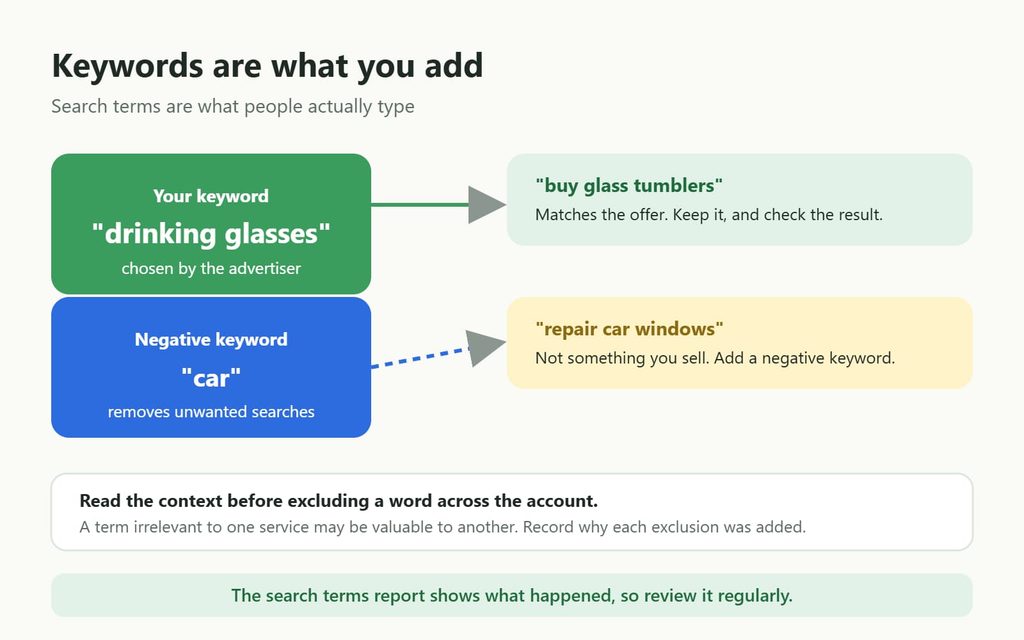
A keyword is an advertiser input. A search term is what a user searched for. Google’s search terms report helps you inspect the searches associated with your ads and identify mismatches.
Add negative keywords when a term clearly concerns something you do not offer. For a company selling drinking glasses, a query about repairing car windows would require a different decision from a query about buying glass tumblers.
Read the context before excluding a word across the account. A term that is irrelevant to one service may be valuable to another. Broad exclusions can remove useful demand as well as waste.
Google does not expose every query in this report. Use the available evidence without assuming it is a complete record of every search or that an absent term never occurred.
Keep a change log. Record why an exclusion was added and at which level, so a future review can distinguish a deliberate choice from an accidental restriction.
5. Check locations, languages and the actual offer
Choose areas the business can serve and review the campaign’s location options. Google distinguishes settings based on presence from broader presence-or-interest settings. Selecting a place name does not always mean every user is physically there.
A local repair company may have different needs from a hotel reaching travellers before they arrive. Choose the setting that fits the buying journey rather than assuming the narrowest audience is always better.
Review language settings and make the ad, page and enquiry process usable for the people you intend to reach. If you advertise support in a language, ensure the business can provide that support.
Inspect traffic and lead quality after launch. Location targeting relies on signals and does not guarantee perfect accuracy. Investigate repeated mismatches instead of assuming the setup screen proves that the audience is right.
Also review the networks and other distribution settings enabled for the campaign. Know where the ads can appear before interpreting results as if every interaction came from the same context.
6. Write ads that make an accurate, specific promise
Connect the searcher’s need to your offer. Name the relevant service or product, explain a meaningful detail and give a suitable next step. A claim such as “request an office cleaning quote” is clearer than a vague promise of exceptional solutions.
Use only claims the business can support. Check dates, prices, eligibility and availability. If the ad promotes a particular offer, the destination should explain that offer immediately.
For responsive search ads, review how the supplied assets work together. Avoid assets that contradict each other or rely on appearing in a particular sequence to make sense.
Treat creative suggestions and interface scores as diagnostic aids. Judge the finished advertising by accuracy and business outcomes, rather than pursuing a score while losing the message.
A useful comparison tests meaningfully different reasons to act, such as a service benefit or a clearer explanation of the process. Changing punctuation alone may teach you little about what customers need.
7. Match the landing page to the ad and remove friction
Google’s guidance recommends a close relationship between the ad, keywords and landing page. A visitor who clicks an offer for a specific service should reach a page that explains that service and the promised next step.
Check the page on a phone. Can someone understand the offer, assess relevant proof and complete the form? Test contact buttons, confirmations and the route by which the enquiry reaches your team.
Keep the call to action consistent. If the ad offers a quotation, do not make the visitor search through unrelated services to find a general contact form. Ask only for information needed at that stage.
TBS Marketing’s landing page design service is relevant when the destination needs a clearer offer, structure or enquiry journey. Fix those obstacles before assuming that more ad spend will solve the conversion problem.
Image compression can help page performance, but adding keywords to image tags does not make a paid ad rank at the top of Google. Keep paid advertising controls separate from assumptions about organic image search.
8. Align budget and bidding, then evaluate patiently
Set a budget you can sustain and a bidding approach that fits the measured objective. Google’s Smart Bidding strategies optimise for conversions or conversion value at auction time. They still depend on useful measurement and appropriate settings.
Check the current labels in your account. Google documents a naming transition from June 2026 for target CPA and target ROAS strategies; a label change does not necessarily mean the bidding behaviour changed.
An average daily budget is not a fixed daily spending cap. For most campaigns, Google states that the daily spending limit can be twice that budget and the monthly limit is generally 30.4 times it. Campaign type and budget changes can affect the applicable limits.
Allow for the time it takes a customer to convert. Reviewing an unfinished conversion period can make recent activity look worse than it ultimately is. Avoid changing bids, budgets, targeting and creative together without a clear reason.
For support across campaign setup, measurement and ongoing optimisation, TBS Marketing’s Google Ads service provides a relevant next step. Bring the business goal and the quality of current enquiries, not only the headline cost per click.
Questions to ask before increasing spend
- Are the recorded conversions genuine and useful?
- Which searches and locations are bringing suitable customers?
- Does the ad promise match the destination?
- Can the team respond to the enquiries it receives?
- What evidence supports increasing the budget?
If clicks are arriving but results are weak, diagnose the full journey. The cause could be irrelevant demand, tracking errors, a confusing offer or poor follow-up. Increasing spend magnifies the existing process; it does not identify which part needs repair.
Choose one campaign and one specific problem to investigate. Record the change and review it against the business result you defined at the start.
Sign in to share. Facebook and LinkedIn need the article page to be publicly accessible to show its preview. If an AI cannot open the page, copy the article text from the section above.