
Choose an AI service. ChatGPT and Perplexity submit the summary request, Grok opens it ready to send, and other services open with the request copied as a fallback. If an AI cannot open the page, copy the article text and paste it into the chat.
Before someone reads your page in detail, its headings should show what it covers and how the ideas fit together.
What is a Heading?
Headings are html tags that indicate the organization of content, they label a section of content and shows how that section fits into the page. It also tells readers what comes next, helps them find the information they need, and gives software an explicit clue about the document’s structure.
Good headings do more than break up a wall of text. They create an outline that develops the promise of the page title and should align with it. Each main section covers part of that promise, each subsection explains part of its parent section, and the body text delivers what its heading announces.
For a business website, this affects how clearly a visitor can understand an offer, how accessible the page is, and how reliably tools can extract or organise its content. Start with the meaning of the page, then choose the appropriate heading level. Avoid emotive language as headings, since descriptive headings are much more machine readable.
What is the difference between a title, a heading and a header?
The HTML title element identifies the document and can contribute to the title link shown in search results. The H1 usually serves as the visible main heading and often matches the Title. H2-H6 organise sections within the page & paragraphs. Google lists both the title element and heading elements among sources it may use when generating a search title link they are also SEO factors.
A header is different again. The HTML header element is a container for introductory content at the top of the page, such as a logo, navigation, or a section introduction. Calling every heading a “header” can create confusion when discussing implementation.
Keep the page title and main heading aligned in meaning. They can use different wording, but a search result promising a guide to heading structure should lead to a page that clearly delivers that guide.
How the H1-H6 heading hierarchy works
HTML provides six heading levels. H1 identifies the highest level, while H6 identifies the deepest level available. These levels express relationships between sections; they are not six font sizes to choose from. W3C and MDN recommend a logical hierarchy, with one main H1 as a straightforward page-authoring practice.
H1: the main topic or purpose of the page.
H2: a major section within that topic.
H3: a subsection of an H2.
H4: a more detailed subsection of an H3.
H5: a further subdivision within an H4.
H6: the deepest available subdivision, within an H5.
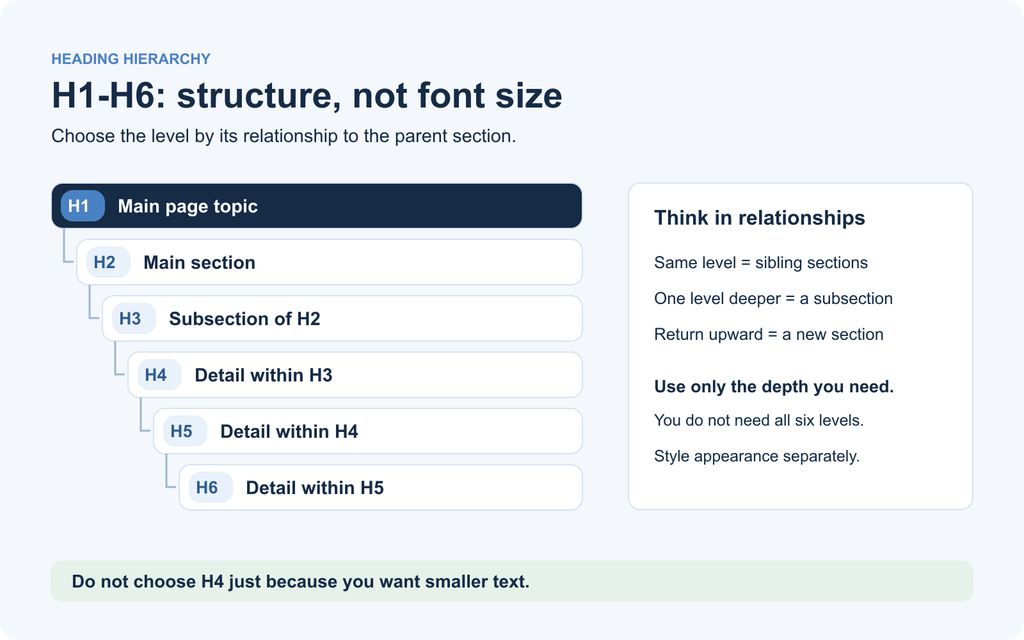
Figure 1. H1-H6 describe structural depth. Use only the levels the content needs, and style their appearance separately.
You do not need all six levels. Use only the depth the content requires. A short article may need H1 and H2; a detailed technical guide may justify further nesting. If your outline reaches H5 or H6, check whether the detail belongs on a separate page or can be explained more clearly without another layer.
HTML example: a heading hierarchy
This example shows all six heading levels and then returns to H2 for a new main section. The deeper levels demonstrate nesting; use them only when your content needs that detail.
<article>
<h1>Hotel booking guide</h1>
<p>Find the room and booking conditions that suit your stay.</p>
<h2>Choose your room type</h2>
<p>Compare the accommodation options.</p>
<h3>Family rooms</h3>
<p>Check the arrangements available for families.</p>
<h4>Connecting rooms</h4>
<p>Confirm which rooms connect.</p>
<h5>Connecting-room availability</h5>
<p>Check availability for your travel dates.</p>
<h6>School-holiday availability</h6>
<p>Ask about date-specific restrictions.</p>
<h2>Review the booking conditions</h2>
<p>Check cancellation terms and any extra charges.</p>
</article>
Sibling headings should cover comparable parts of the topic
Two H2 headings sit at the same structural level. They might cover “Room types” and “Hotel facilities.” An H3 called “Family rooms” belongs inside “Room types,” rather than alongside the whole facilities section. Choose the level by the relationship, not by how large you want the text to look.
Move down one level when opening a subsection
Avoid jumping from H2 directly to H4 when introducing a new subsection. Returning from H4 to H2 is different: it closes the detailed subsection and starts another main section. That upward return is a normal part of a document outline.
Use styling controls to change appearance
If an H2 looks too large, adjust its typography through the design settings or CSS. Do not turn it into an H4 simply to reduce the font size. A paragraph made large and bold also does not acquire heading semantics automatically.
Headings should develop the promise of the title
A page title establishes the subject and the reader’s task. The headings should build a useful route through it. For this article, the central promise is to explain what headings are and how to use them. Definitions, hierarchy, accessibility, machine processing, examples, and an audit all serve that promise.
A detour into unrelated advertising platforms would weaken the outline, even if the page used its H tags correctly. Correct numbering cannot repair a disconnected argument.
W3C’s descriptive-heading guidance connects section labels with both the page as a whole and the other sections. Apply that principle by asking two questions: does this heading belong under the title, and does this subsection belong under its immediate parent?
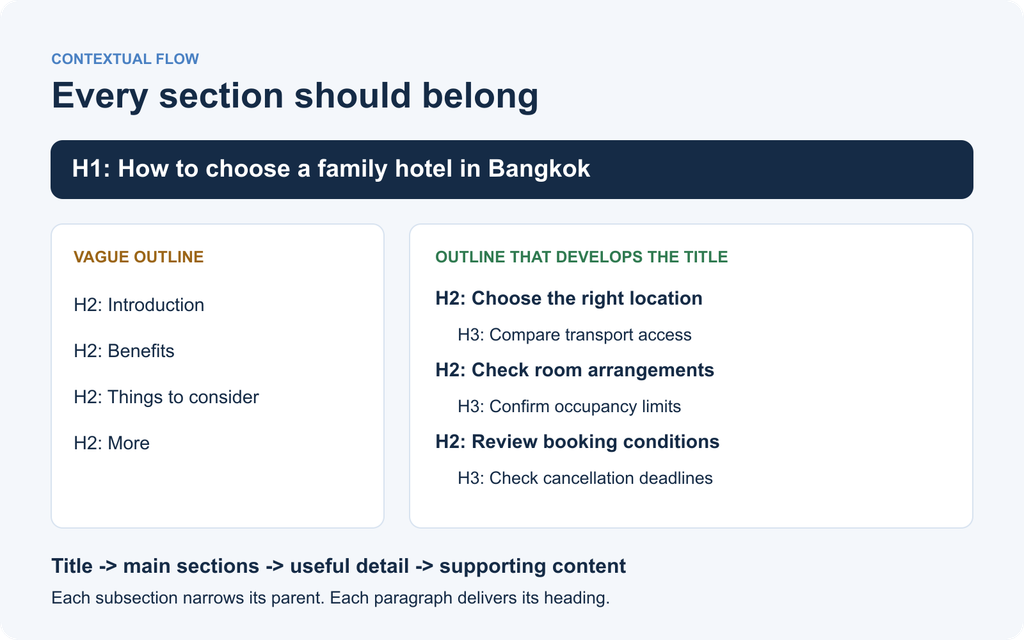
Figure 2. A useful outline develops the title’s promise. Each subsection narrows its parent topic.
Build a sequence that matches the reader’s task
For an explanatory article, a useful sequence might be definition, mechanism, example, mistakes, and practical steps. For a service page, it could be the problem, the service, the process, evidence, and the next action. These are editorial options, not mandatory search-engine templates.
Avoid repeating the same section in different words. “Why headings matter” and “The importance of headings” probably overlap. Combine them unless each section answers a genuinely different question.
Read the outline without the paragraphs
Temporarily hide the body text or use a TOC. Can you still identify the page’s purpose, predict what each section contains, and follow the argument? Labels such as “More information,” “Other things,” and “The benefits” may be too vague for that job. Replace them with the specific subject or decision the section addresses.
For example, “How heading levels improve navigation” says more than “Why it matters.” The wording should remain concise; useful context does not require repeating the complete page title in every heading.
Why headings matter for accessibility
Headings support navigation, including through assistive technology. A screen-reader user may move between headings or review a heading list rather than read every paragraph in sequence. Descriptive labels and meaningful levels help that navigation reflect the actual page.
Check both the wording and the markup. “Facilities for wheelchair users” is more informative than “Facilities” when that is the section’s subject. But a descriptive phrase styled as a normal paragraph still lacks native heading semantics. Conversely, an H2 called “Things” has a structural role but gives little useful direction.
Accessibility should be part of the writing and publishing process. Review what the heading list communicates, and make sure visual order, reading order, and section relationships agree. Do not choose levels solely to make a design look balanced.
How lightweight tools can use headings to process a page
Some low-cost or resource-constrained tools work with a reduced representation of a page. They might extract the title and headings for an initial audit, build an outline, or pass only selected sections into later analysis. In those workflows, a clear heading carries useful information before the full prose is examined.
A concrete example is Screaming Frog’s documented extraction of H1 and H2 information, with custom extraction available for other levels. LangChain also provides a heading-aware HTML splitter that uses headings when organising content and attaching section metadata. These are different operations: extracting labels for a report and dividing content into structured pieces.
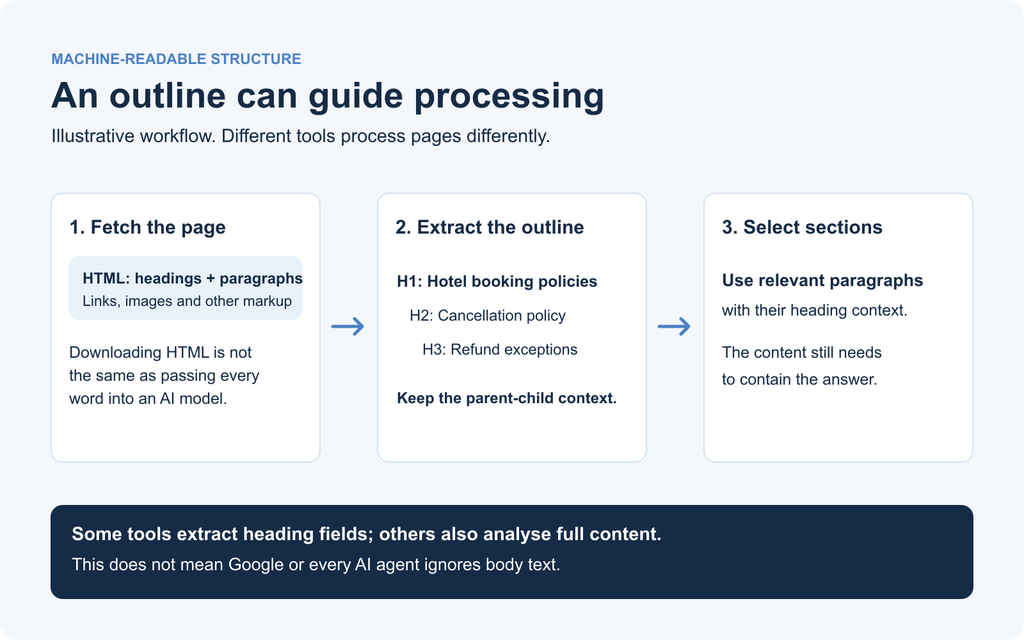
Figure 3. One possible processing workflow: fetch HTML, extract an outline, and select content with its context. This is not a universal crawler design.
Fetching HTML is different from reading every paragraph
A tool may download the HTML and then retain only selected fields in its output. That does not mean it downloaded only the heading tags. Likewise, choosing not to send the full page to a language model is a processing decision, not proof that the crawler never obtained the body text.
A short outline can reduce the amount of text passed into a later processing step. Whether that saves time or money depends on the implementation, the page, and what the tool needs to do. Do not attach a universal performance percentage to headings.
Headings can supply context for retrieved sections
In retrieval systems, content is often divided into pieces for later selection. LangChain’s published example demonstrates keeping heading information as metadata for those pieces. A paragraph about “cancellation deadlines” can then retain its relationship to a parent section about booking policies.
This helps explain why heading wording and contextual flow deserve attention. A section labelled only “Exceptions” is less informative when separated from its neighbours. “Exceptions to the cancellation policy” gives a clearer cue, while the paragraph beneath it should state the actual conditions.
Body content still has to deliver the answer
There is no basis here for claiming that Google or every AI agent reads only headings. Google’s guidance for AI search features still calls for helpful content and important information in textual form. Headings can organise the evidence; they cannot replace it.
Write a clear opening sentence under each heading, then provide the details, qualifications, and examples needed to answer it. Avoid headings that promise a comparison, cost, or step-by-step method when the section never supplies that information.
What headings can and cannot do for SEO
Google documents headings as one possible source for search title links. That supports making the main heading clear and consistent with the page topic. It does not establish a fixed ranking bonus for a keyword in an H2 or a penalty every time a page skips a level.
Use the terms people need to understand the subject naturally. “How to choose heading levels” is useful. Repeating “best heading SEO heading tags” across the outline is not a substitute for explaining the topic.
Separate sound publishing practice from guaranteed outcomes. Better structure supports understandable content, but a heading change alone does not guarantee higher rankings, AI citations, more enquiries, or improved conversion. Evaluate it alongside the page’s accuracy, usefulness, accessibility, and wider search performance.
A practical example: turn vague labels into a useful outline
Suppose a page is called “How to choose a family hotel in Bangkok.” A weak outline might use “Introduction,” “Benefits,” “Things to consider,” and “More.” Those labels do little to show which decisions the article helps with.
A stronger example outline is:
H1: How to choose a family hotel in Bangkok
H2: Choose a location that fits your itinerary
H3: Compare transport access and journey times
H2: Check the room arrangements your family needs
H3: Confirm connecting rooms and occupancy limits
H2: Review facilities and booking conditions
H3: Check breakfast, cancellation and extra charges
Each H2 advances a part of the title’s task. Each H3 narrows its parent section. The sequence moves from location to rooms to the conditions of the stay. The text beneath those headings would still need verified information; the outline only defines the work it must do.
The same test applies to a service page, product guide, or FAQ. Keep sibling sections distinct, put detailed questions under the right parent, and remove sections that belong to a different article.
Watch the original video about H1 tags
The video linked in the original article is retained here. Use the written guide for the expanded discussion of H1-H6, contextual flow, accessibility, and heading-aware processing.
Watch the original H1 video on YouTube:
Common heading mistakes to fix
- Choosing a tag for its font size: select the structural level first, then style it.
- Using bold paragraphs as headings: apply a real heading element when the text labels a section.
- Jumping into unnecessary depth: add H4-H6 only when genuine subdivisions exist.
- Repeating the same topic: merge overlapping sections or clarify their different jobs.
- Drifting away from the title: move unrelated content to a more suitable page.
- Promising an answer the section does not give: revise the label or supply the missing content.
- Adding keywords to every heading: prioritise descriptive wording and readable flow.
How to audit headings before publishing
Start with the page’s intended reader and purpose. Write that purpose in one sentence, then compare every main heading against it. If a section does not help deliver the purpose, reconsider its place.
Next, inspect the published heading structure rather than relying only on the editor. Check that the template supplies the expected H1 and that body sections use the intended levels. Page builders and themes can change the final markup.
Read the headings as an outline, then read each heading with its opening paragraph. Check that the paragraph answers the label and that important qualifications remain with the relevant information. Finally, review the mobile layout and navigation so that the structure remains usable in the actual design.
Frequently asked questions about headings
Must every page include H1 through H6?
No. Use the levels your structure needs. A simple page does not need invented subsections merely to include all six tags.
Can an H3 be followed by an H2?
Yes. That normally closes a subsection and begins another main section. Avoid skipping levels when opening a deeper subsection, rather than forcing every heading to descend.
Should the H1 exactly match the SEO title?
They should communicate the same central topic, but the wording can differ. Review whether the search promise and the visible page heading describe the same content.
Do headings replace a table of contents?
No. Headings define the sections; a table of contents can link to them. For a long guide, those links may help visitors reach the section they need.
Do AI tools ignore paragraphs and read only headings?
Some tools extract a heading outline or process selected sections. Others analyse more of the page. Give them descriptive structure and substantive text rather than relying on a supposed universal shortcut.
Give your content a structure worth following
TBS Marketing can help review how your page titles, headings, and body content work together with our SEO Services and AI Optimisation services. Start with a page that attracts relevant visitors but leaves questions unanswered, and examine whether its outline matches the task those visitors came to complete.
If you read only your page’s headings, would you understand what it offers and where to find the answer?
Sign in to share. Facebook and LinkedIn need the article page to be publicly accessible to show its preview. If an AI cannot open the page, copy the article text from the section above.