
Choose an AI service. ChatGPT and Perplexity submit the summary request, Grok opens it ready to send, and other services open with the request copied as a fallback. If an AI cannot open the page, copy the article text and paste it into the chat.
A meta description is a short summary of a web page’s content that should not exceed 150 to 160 characters (or up to roughly 920 pixels on desktop) to prevent truncation in search results. These descriptions are meant to give users an accurate and concise summary of what a website or webpage is about. It is typically used by search engines to display a page’s title and meta tags in search results. Meta descriptions can also be used by social media platforms to generate previews of a page’s content. Meta descriptions are therefore a valuable opportunity to tell potential visitors what your page is about and why they should click through to it. While meta descriptions are not a ranking factor, they are an important part of your on-page SEO and can help improve your click-through rate (CTR, which is a ranking factor), which we cover here.
Purpose of meta descriptions
It is meant to give users and machines an overview of what the page is about before they click through to it or process it. The meta description can be used by search engines to generate snippets for a given page in SERPs (search engine results pages). In addition, meta descriptions can also be used by social media platforms such as Facebook and Twitter when a page is shared or by AIs that do not want to parse the whole page. While the meta description is not a direct factor for Google, the CTR of your listing in results is.
This means you should be looking at what your audience is looking for and adapting the Meta description to match your targets. Similar to how you might optimise your Google Ad Descriptions for maximum impact you would do the same for Meta Descriptions.
How can meta description help with SEO?
Apart from its primary purpose of giving users an overview of the page, it can also be used to support SEO efforts in the form of CTR improvements. Although meta descriptions don’t directly affect search engine rankings, they can indirectly influence how often people click on your listing when it shows, which is a ranking factor and helps tell Google how well your content matches a particular search intent. Moreover, a well-written meta description can help to convince users to click on your listing instead of your competitors’. As such, including relevant keywords and creating an enticing meta description should be part of any good SEO strategy.
Meta description examples for different pages
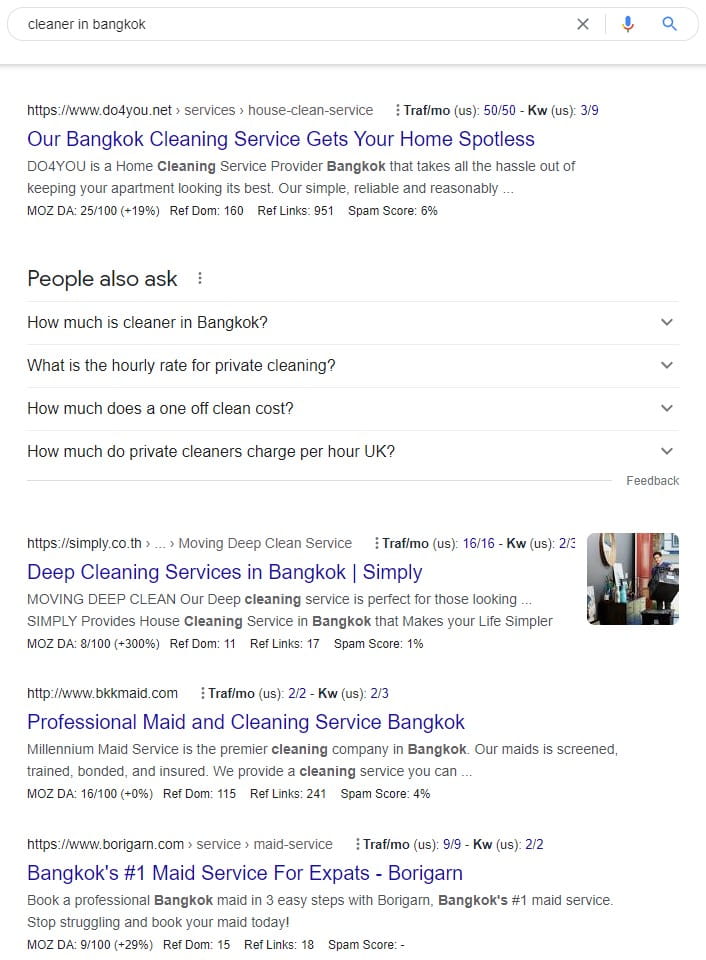
Let’s take a look at an example for the search term “Cleaner in Bangkok”, consider the verbiage used and the coverage of the topic within the context of what you would be looking for. So in this example,
- You have First pushing the hassle-free aspect and how they are reliable
- Second thinks people also look for Deep Cleans or Moving with a focus on house over home
- The third is the premier option apparently, with maids screened, trained, bonded and insured – so trying to make you feel safe with your choice
- Fourth claims booking a maid in 3 simple steps – so ease of use looking to target the lazy market.
Example for an informational article
Page: a beginner’s guide to meta descriptions.
Description: “Understand meta descriptions with clear examples, an HTML sample, and practical advice on writing summaries that match your page.”
This works as an editorial brief because it identifies the topic and promises specific help. The article should then contain the examples, sample, and guidance it advertises.
Example for a product page
Page: an insulated travel mug.
Description: “Explore this insulated travel mug, check its capacity and materials, and review delivery options before ordering.”
A more specific version could include verified product details. Avoid filling the space with unsupported superlatives when useful information about the item would help someone decide.
Example for a contact page
Page: a company contact page.
Description: “Contact our team about your project. Find our office details, enquiry form, and the information to include when requesting a consultation.”
Match the description to the actual contact options. If the page has no office address or consultation process, revise the copy. Contact-page descriptions should help users reach the right place rather than repeat a generic homepage pitch.
What does a meta description look like in HTML?
MDN describes the meta element’s name and content attributes as a way to supply document metadata. A description is normally added within the page’s head section and looks like follows.
<head>
<title>What Is a Meta Description? | Example Site</title>
<meta
name=”description”
content=”Learn what a meta description is, with examples and writing tips.”>
</head>
The title element often called the Meta Title and the meta description do different jobs. The title identifies the document; the description summarises it concisely. The visible H1 belongs to the page content and introduces the subject to readers.
On a WordPress site, you would usually edit the description through the site’s SEO controls rather than insert a second tag manually. Check the published output afterwards, particularly if the theme, page builder, or another plugin also manages metadata.
What is the purpose of a meta description?
Think of the description as a concise introduction to a particular page. It should help someone recognise the subject, understand what the page offers, and decide whether it matches the task they are trying to complete.
A service page might emphasise the location and the problem the service addresses. A product page can highlight information needed to evaluate the item. An article should explain the question it answers. The right approach depends on the page, rather than on a universal formula.
Google’s documentation distinguishes the meta description you provide from the snippet its systems display. Google primarily generates snippets from page content and may use the description when that better represents the result. Different searches can produce different snippets.
That makes the body content part of the job. If your description promises cancellation guidance, a price comparison, or an HTML example, place a clear answer on the page. Metadata should introduce useful content, not compensate for its absence.
Are meta descriptions a Google ranking factor?
Google has stated that it does not use the description meta tag for ranking, although it may use it in search snippets. Write the description to communicate accurately and attract relevant visits, not as a place to add a supposed ranking signal.
Click-through rate alone is too simple a basis for predicting the ranking effects of rewriting descriptions. A change in your page’s Search Console CTR does not, by itself, establish that the description caused a ranking change.
CTR is clicks divided by impressions. It is useful for examining how a listing performs, but comparisons need context: query mix, search position, device, competing results, and whether Google displayed the description you supplied. Treat a result as an observation to investigate.
A description that attracts the right visitor can be valuable without being a direct ranking factor. Review enquiries, sales, or other relevant actions alongside clicks. A larger volume of poorly matched visits is not the same as a better outcome.
How long should a meta description be?
There is no fixed Google character limit for the meta description itself. Google’s snippet guidance says displayed text can be truncated to fit the device width. A target of around 150-160 characters can be a writing guideline, but it is not a technical requirement.
Write a concise summary and put the most useful information early. A preview tool can help you spot an awkward sentence or a message that depends on its final words. It cannot promise exactly how the live result will appear.
Do not remove a useful detail just to hit an arbitrary count, and do not pad a complete explanation to reach a target. Ask whether someone can understand the page’s value from the part most likely to be visible.
How to write a useful meta description
Start with the page’s actual purpose
Write down what a visitor can do or learn after opening the page. If that is difficult to state, the page may need a clearer focus before its description can be improved.
For this article, the purpose is to explain meta descriptions and show how to use them. A pitch about every service an agency offers would distract from that task.
Use the language of relevant search intent
Review the queries associated with the exact page when Search Console data is available. Group related searches by intent rather than inserting every variation into the description. Definition queries, example queries, and requests for a checker may represent different tasks.
If a guide is appearing for example-related searches, check whether it actually offers useful examples. Strengthen the relevant section before promising examples in the description. A passing impression for an unrelated phrase is not a reason to retarget the page.
Choose one clear reason to visit
Replace vague copy such as “Welcome to our website for more information” with a concrete explanation. Name the subject and the help available. For a commercial page, use a next step that suits the visitor’s stage rather than forcing a sales message into every description.
Compare these illustrative versions:
Weak: “Meta description, SEO description, best meta descriptions, website descriptions.”
Clearer: “Learn what a meta description is and compare examples for articles, products, services, and contact pages.”
Check every promise against the page
Before publishing, underline each claim in the proposed description. Can the page support it? Look for examples, product information, service areas, policies, or contact details that substantiate what you are saying.
Also check the title, H1, headings, and opening paragraphs. They should tell a coherent story. A description offering a beginner explanation should not lead straight into unexplained technical detail.
Why might Google show a different description?
The search snippet is selected for the result and query; it is not a fixed copy of your metadata. Seeing a different excerpt is not sufficient evidence that the description field failed to save.
First verify the published tag. Then compare the visible excerpt with the page content and the searcher’s likely task. If the excerpt points to a poorly explained section, improve that section. Avoid repeatedly rewriting the description without checking what problem you are trying to solve.
Keep a record of the query, date, device, supplied description, and observed result when assessing a change. A screenshot captures one observation, not a permanent display rule.
Should you leave a meta description blank?
Google can create a snippet from the page without a supplied description, but that does not establish that leaving all blog descriptions empty produces better results.
For a focused page, a deliberately written summary gives you a useful description to review. On a larger site, prioritise important pages and use accurate, page-specific templates where appropriate. Compare the result with the underlying content rather than assuming that either manual or automatic wording always wins.
If you decide to test a blank field on a suitable page, document the reason and retain the previous description. Do not make a site-wide change based on one isolated search result.
Meta descriptions, social previews and AI tools
A social preview may use separate metadata. The Open Graph protocol defines og:title, og:description, and og:image. Review those settings separately when you want a particular sharing preview, rather than assuming every service will use the standard description tag.
Some software may extract description metadata as part of a page summary. That is not evidence that every AI assistant uses it, ignores the body, or gives a page more visibility because the description was rewritten.
Google’s guidance for AI Overviews and AI Mode continues to emphasise established SEO practices and useful page content. A meta description is one part of maintaining a clear page, not a shortcut to AI recommendations.
How to evaluate a description change
Start with the exact page and a defined period. Record clicks, impressions, CTR, and average position, then examine the relevant query groups. Keep device and country filters consistent when comparing periods.
Change one clearly defined message when possible and record the date. Review whether the updated page still answers its existing relevant queries. If the query mix or position changes, avoid attributing the whole difference in CTR to your new wording.
A before-and-after comparison is not a randomised A/B test. Search demand, results, and page visibility can change between periods. Low-volume pages also need caution: a small number of impressions and clicks can produce large percentage movements without reliable evidence of an improvement.
The test should answer a business question. Did a clearer description and better content attract more relevant visitors? Did those visitors take the intended next step? If the evidence is too limited, keep the finding provisional.
A publishing check for meta descriptions
- Does the description summarise this specific page?
- Does it match the title, H1, and substantive content?
- Are the promised details actually present and accurate?
- Does it read naturally without a list of keyword variations?
- Is the useful information clear near the beginning?
- Does the published page contain the intended description tag?
- Have you checked social metadata separately where needed?
- Have you recorded changes so their effects can be reviewed?
Give each page an accurate introduction
TBS Marketing can help review whether your titles, descriptions, and page content work together as part of your on-page SEO. Start with a page that already receives relevant impressions, identify what its searchers need, and make sure the page delivers that answer.
If someone read only your description, would they know what they would gain by opening the page?
Sign in to share. Facebook and LinkedIn need the article page to be publicly accessible to show its preview. If an AI cannot open the page, copy the article text from the section above.